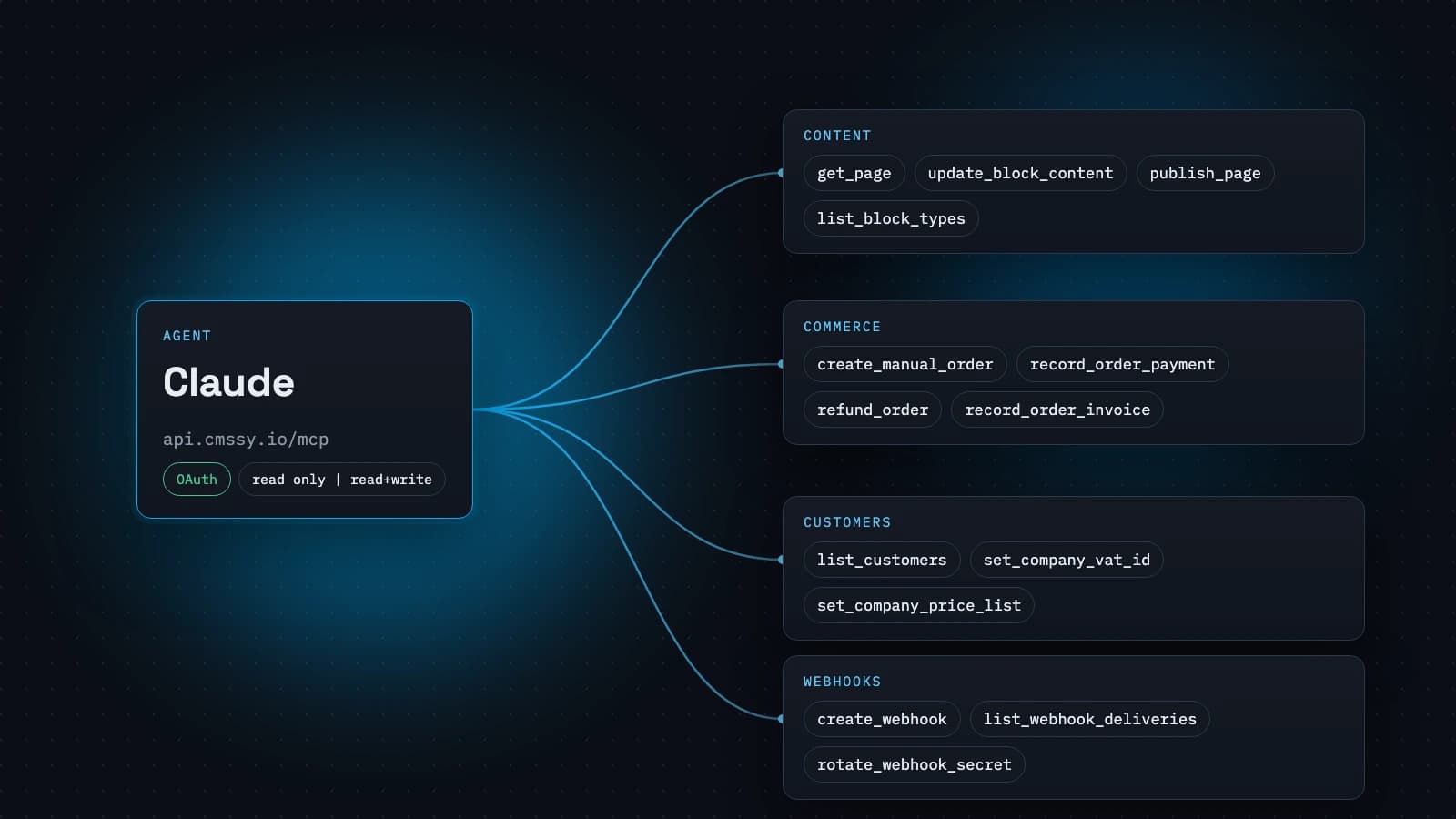
A Commerce MCP Server: What Your Agent Can Run in cmssy
Every CMS ships an MCP server now. Here is what the cmssy one reaches - a wholesale order from price list to invoice, handled in one conversation, and the guardrails around it.
An MCP server is now table stakes for a CMS. Contentful, Sanity, Storyblok and Payload all ship one, and an agent can write and publish content on any of them. The question has moved on: what can the agent reach once it is connected? For a store, the answer decides whether an agent is a copywriter or an operator.
This post walks through what the cmssy MCP server exposes, how you connect to it, a wholesale order handled end to end in one conversation, and what still needs work.

What MCP changes, and what it does not
MCP standardizes how an agent discovers tools and calls them. It does not make your data any cleaner. An agent connected to a store whose orders live in one system, prices in a spreadsheet and copy in a CMS will spend its turns stitching three APIs together, and it will get the seams wrong.
cmssy keeps the pieces in one workspace: pages and blocks, custom data models, products and stock, price lists and sales channels, customers and their companies, carts, orders, returns, parcels and invoices. One server exposes all of it, under one set of roles. That is the whole argument of this post, and everything below is what it looks like in practice.
Connecting
There are two ways in.
- Hosted, for Claude. Claude on the web, Claude Desktop and Claude Code connect to
https://api.cmssy.io/mcp. You sign in to cmssy (OAuth 2.1 with PKCE), tick the workspaces Claude may use and choose Read only or Read and write. There is no token to copy and nothing to install. In Claude Code it is one command:claude mcp add --transport http cmssy https://api.cmssy.io/mcp, then/mcpto sign in. - stdio, for everything else. CI jobs, scripts and any MCP client run
npx @cmssy/mcp-serverwith an API token (cs_…) and a workspace id. Same tools, same permissions.
Either way the agent acts as the person who connected it, with that person's role in each workspace, and every change lands in the workspace's audit log under their name. One connection can span several workspaces: every tool takes a workspace argument and list_workspaces returns the ones you granted.
What the server exposes
As of October 2026 the server carries 132 tools. They share one naming shape - list_* and get_* to read, create_*, update_* and delete_* to write, plus verbs for state transitions - and fall into a handful of groups:
- Content - pages, blocks, layout regions, page types, publishing, media, forms and their submissions, custom models and records.
list_block_typesreturns the block types your site actually registers, so the agent fills the fields your components render instead of guessing. - Catalogue - products, variants, volume tiers, prices per currency, bulk updates.
- B2B pricing - price lists with a percent off or fixed prices per product and variant, dated windows, sales channels, and assignment to a company or a customer.
- Customers and companies - the accounts that sign in to your site, their companies, EU VAT ids and their verification, tax exemptions, suspensions and password resets.
- Orders - manual orders, edits, payments recorded, refunds, cancellations, the order pipeline, parcels and tracking, returns, invoices and correction invoices, anonymization.
- Webhooks - endpoints, delivery logs, redelivery and secret rotation.
The complete list, with the permission each tool needs, is generated from the server on every release and published as the MCP tool catalogue.
Two things are deliberately absent. No tool touches your code: nothing writes a file, edits a component or opens a pull request, because block schemas live in your repository under review. And no tool moves money: cmssy records payments and refunds your provider made, it never charges a card.
A wholesale order, quote to invoice
Here is a B2B case that usually spans an ERP, a pricing spreadsheet and two admin panels. A hardware distributor signs a new trade customer, agrees contract prices on three products, takes the first order by email and ships it. Every step below is a prompt to Claude and the tools it calls.

1. A price list for the account
Create a price list "Trade - Nordbau" with 12% off the catalogue,
and fixed prices for the three couplings from the attached sheet.
create_price_list with percentOff: 12, then set_price_list_entries with the fixed prices in minor units. A fixed price overrides the percent for its product or variant; everything else gets the catalogue price minus 12%. The call is all or nothing: one bad row refuses the whole import and names the row.
2. The company
Nordbau GmbH's VAT id is DE123456789 - I checked it in VIES.
Put them on the new list.
set_company_vat_id normalizes and format-checks the id, set_company_vat_verified records that someone checked it, and set_company_price_list attaches the list. Every member of the company is now priced from it. A verified VAT id from a member state other than the seller's zero-rates their orders as reverse charge, unless the order ships to the seller's country.
Notice the split: verifying a VAT id changes how orders are taxed, so it needs a stronger permission pair than setting the id. An agent connected by someone who lacks that pair gets an error.
3. The order
Nordbau emailed an order: 40 x NW7.2 coupling, 25 x NW10,
ship to their Hamburg depot. Enter it.
create_manual_order with the customer and the lines. Because the buyer belongs to Nordbau, the lines are priced from the company's list, and the shipping address decides the tax treatment, which the order freezes. get_order shows exactly what was applied: the list that priced each line, the VAT treatment and the legal note to print.
4. The payment
The bank transfer for that order arrived, reference NB-2026-118.record_order_payment with the amount and the reference. Partial payments are fine; the amount is capped at the balance due, and the order moves to paid once it is covered.
5. The parcel
It went out with DHL, tracking 00340434...create_shipment with the carrier and tracking number. Leaving out the items sends every unit not yet shipped, and the order is marked fulfilled.
6. The invoice
Our accounting system issued FV/2026/1042 for it - here's the PDF link.record_order_invoice stores the number, link and provider on the order and fires order.invoiced. Recording the same number again is a no-op, so an agent that retries does no harm. A refund later gets a correction invoice with record_order_invoice_correction; the invoicing post covers the automated version of this step.
None of this is a benchmark. It is the shape of the work: every step is a tool with a narrow input, every step is checked against the role of the person who connected, and the agent never needs a second vendor's API to finish the job.
Guardrails
An agent that can verify a VAT id or refund an order deserves more care than one that edits a heading. Four layers limit it, from the outside in.

- Client approval. Every tool carries MCP annotations:
readOnlyHinton tools that only read,destructiveHinton tools that change or remove data. Claude Code asks before any tool not on your allowlist, so keeprefund_order,cancel_order,publish_pageand the delete tools off it and approve each one as it comes. - Read-only grant. A hosted connection granted read only refuses every write on the server, whatever the client approves.
- Your role. The agent has exactly the permissions you have in that workspace. Disconnecting in Account → Connected apps cuts it off everywhere at once; a workspace admin can remove one workspace from a member's connection.
- The audit log. Every change is recorded under the name of the person who connected the agent, like a change made in the admin.
One honest note: the MCP server itself has no confirmation step. A destructive tool runs on its first call, and the check is your client's approval. The admin's built-in assistant is the exception - there the server holds a destructive tool until you approve it with a button.
What still needs work
- Other app builders. The hosted server registers clients through Client ID Metadata Documents, which Claude supports. Builders that only speak Dynamic Client Registration or a static bearer token, such as v0, Lovable and Bolt, cannot connect to the hosted endpoint yet, and as hosted tools they cannot run the stdio package either. Their generated apps read content through the SDK just fine; it is the build-time agent connection that is the next gap to close.
- Search. Full-text search across content is available in the admin's assistant but not bound on the MCP server.
- New workspaces. A workspace you join after connecting is not added to the connection. Connect again to include it.
Try it
Add the hosted server to Claude, sign in, and ask it to list your orders. The MCP server docs cover both connection methods, the Claude Code tutorial builds a page with it, and the support-case walkthrough handles a refund, a discount and a banner in one conversation. Content works on every plan; cart and checkout need Pro.